Fortinet Log Forwarding
Complete guide to configuring Fortinet FortiAnalyzer log forwarding modes
Complete guide to configuring Fortinet FortiAnalyzer log forwarding modes, including Forwarding Mode and Aggregation Mode setup.
Overview
FortiAnalyzer supports two mechanisms for sending logs to another server:
- Forwarding Mode – Client-only configuration; server requires no setup.
- Aggregation Mode – Requires configuration on both client and server; designed for centralized log collection.
This document describes configuration steps, parameters, and behavior for both modes.
Forwarding Mode
Summary
- Enabled from GUI.
- No configuration required on the receiving server.
- Sends logs in real-time or periodic intervals based on settings.
- Supports forwarding to FortiAnalyzer, Syslog, or CEF servers.
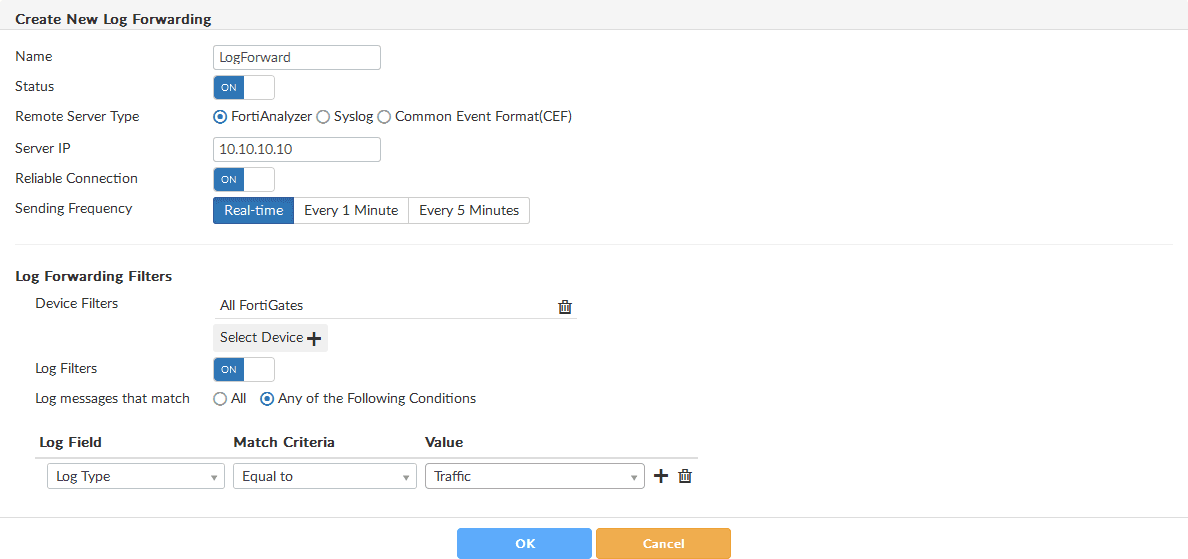
Configuring Forwarding Mode (Client Side – GUI)
Steps
- Navigate to: System Settings → Log Forwarding
- Click Create New.
- In the Create New Log Forwarding panel, fill in the fields described below.
- Click OK to enable log forwarding.
Configuration Fields
| Field | Description | Required | Default |
|---|---|---|---|
| Name | Name of the remote server entry. | Yes | - |
| Status | ON = enable forwarding; OFF = disable. | Yes | OFF |
| Remote Server Type | Choose: FortiAnalyzer, Syslog, or CEF. | Yes | - |
| Server IP | IP address of the destination server. | Yes | - |
| Server Port | Port number (Default 514). Only shown for Syslog/CEF. | No | 514 |
| Reliable Connection | ON = TCP, OFF = UDP. Ensure server supports TCP before enabling. | No | OFF |
| Sending Frequency | (FortiAnalyzer only) Real-time, Every 1 Minute, or Every 5 Minutes (default). | No | Every 5 Minutes |
Log Forwarding Filters
Device Filters
- Click Select Device to choose which devices will forward logs.
Log Filters
- Turn ON to filter forwarded logs.
- Choose All or Any conditions.
- Add filter rules:
- Log Field → Match Criteria → Value
Exclusions (Syslog/CEF only)
- Turn ON to exclude certain logs.
- Specify:
- Device Type
- Log Type
- Add excluded log fields under Fields → Select Log Field.
Device Registration Notes
Devices forwarding logs to another FortiAnalyzer appear as unregistered on the receiving server.
You must register them manually: System Settings → Device Manager → Add Device
Aggregation Mode
Summary
- Configured only via CLI.
- Requires server-side acceptance of log aggregation.
- Designed for hierarchical FortiAnalyzer deployments.
Checking Existing Log Forwarding Entries
Use this command on the client to view configured IDs:
get system log-forwardServer-Side Configuration
-
Ensure a Super_User admin exists
- If not, create one.
-
Enable log aggregation
Enable log aggregation config system log-forward-service set accept-aggregation enable set aggregation-disk-quota <quota> # Optional endaggregation-disk-quotadefines storage allowed for aggregated logs.
Ensure a Super_User admin account exists on the server before enabling aggregation mode.
Client-Side Configuration (CLI)
-
Enter log-forward shell
Enter log-forward configuration config system log-forward -
Create or edit a forwarding entry
Create/edit forwarding entry edit <log_forwarding_ID> -
Set mode to aggregation
Set aggregation mode set mode aggregation -
Configure server details
Configure server details set server-name <server_display_name> set server-ip <xxx.xxx.xxx.xxx> -
Enter authentication credentials
These belong to the Super_User admin created on the server.
Set authentication credentials set agg-user <username> set agg-password <password> -
(Optional) Set aggregation time
- Value: 0–23 hours
- Default: 0 (midnight)
Set aggregation time set agg-time <hour> -
Apply configuration
Apply configuration endAfter success, FortiAnalyzer displays:
check for cfg[<log forwarding ID>] svr_disp_name=<server-name>
Summary Comparison
| Feature | Forwarding Mode | Aggregation Mode |
|---|---|---|
| Server Configuration | Not required | Required |
| Client Configuration | GUI | CLI only |
| Use Case | Simple forwarding to servers | Centralized log aggregation |
| Authentication | Not required | Requires Super_User credentials |
| Sending Frequency | Real-time or periodic | Aggregated at set hour |
Create New Log Forwarding